

Most broken pipelines fail for the same few reasons. Logic hides in YAML. A failure gets swallowed. A temporary file outlives the job. A token can write more than it needs to.
This post lists ten rules I use to avoid those failures. Each rule links to working, tested code in rzv-ci-plb, the Runzivo CI playbook, my open-source companion repository. The next three posts go deeper on scripts, error handling and security.
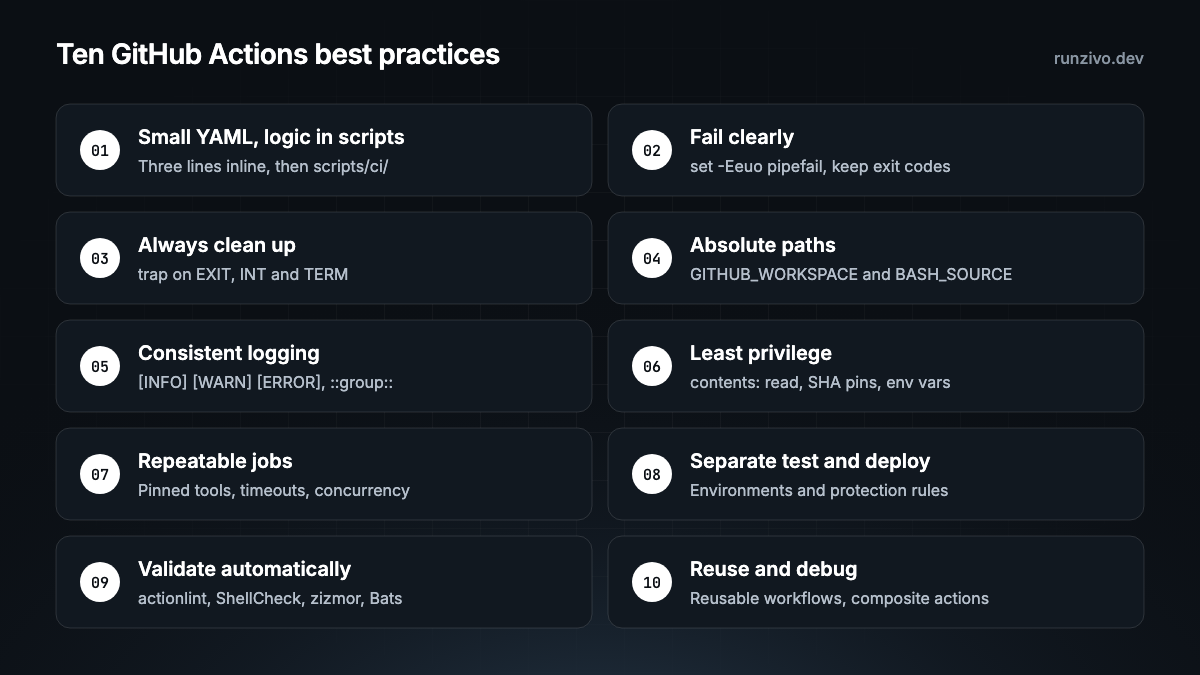
1. Keep YAML small and put logic in scripts
Mistake: a 40-line run: block with loops, retries and if checks. You can't run it locally, lint it well or test it.
Do this: keep commands of three lines or fewer inline. Move anything with conditions, loops, retries or cleanup into a script. Every script should also run outside GitHub Actions.
The three-line limit is my convention, not a GitHub rule. It follows the Google Shell Style Guide, which says to move scripts over 100 lines, or with non-straightforward control flow, to a more structured language.
Example: examples/nodejs/ci/01-test.sh.
2. Fail clearly and keep the exit code
Mistake: || true or continue-on-error: true with no comment. The job turns green and the bug ships.
Do this: start Bash scripts with set -Eeuo pipefail. Install an ERR trap that names the file, line and command. Fail with a specific exit code. If you must ignore a failure, write down why next to the line.
Example: die and errors_install_traps in scripts/lib/03-errors.sh.
3. Always clean up
Mistake: temporary directories, containers and test resources left behind when a step fails halfway.
Do this: register cleanup as you create each resource. Run it from an EXIT trap that keeps the original exit status, and handle INT and TERM too. A trap can't run after SIGKILL or a lost runner, so keep resources disposable.
Examples: scripts/lib/04-cleanup.sh and the container cleanup in examples/docker/ci/02-test.sh.
4. Use absolute paths
Mistake: cd ../.. and relative paths that only work from one directory.
Do this: use $GITHUB_WORKSPACE in workflows. Inside scripts, resolve paths from ${BASH_SOURCE[0]}. Quote every path. Validate paths that come from input.
These two lines open scripts/ci/01-validate.sh:
SCRIPT_DIR="$(cd -- "$(dirname -- "${BASH_SOURCE[0]}")" && pwd -P)"
REPO_ROOT="$(cd -- "${SCRIPT_DIR}/../.." && pwd -P)"
Input paths: path_within in scripts/lib/02-paths.sh.
5. Log the same way everywhere
Mistake: a wall of output with no step names and an error message that says only "failed".
Do this: use [INFO], [WARN] and [ERROR] with UTC timestamps. Use GitHub's ::group:: and ::error:: workflow commands, and write a short result to $GITHUB_STEP_SUMMARY. Never print a credential.
Example: scripts/lib/01-logging.sh.
6. Grant least privilege
Mistake: no permissions: key, third-party actions pinned to a moving tag, and event text pasted straight into shell code.
Do this: set permissions: contents: read at the top of the workflow. Pin third-party actions to a full commit SHA. Pass untrusted values through environment variables. Post 4 covers this in detail.
See docs/security.md.
7. Make jobs repeatable and safe to retry
Mistake: unpinned tool versions, no timeout, and two deploys racing each other.
Do this: pin tool versions and their checksums, and commit lockfiles. Set timeout-minutes. The job default is six hours, per the workflow syntax reference. Add a concurrency group. Retry only failures you know are temporary.
Example: the pinned versions and SHA-256 digests in scripts/ci/00-install-tools.sh.
8. Separate test, build and deploy
Mistake: one job that tests a pull request and also holds production credentials.
Do this: pull request checks run with no deploy secrets. Deploys run after checks pass, from main, through a GitHub environment with protection rules where your plan supports them. I name environments by stage, such as 04-prd-01 for the first production environment.
See the deploy gate in docs/environments.md.
9. Validate every workflow automatically
Mistake: finding a YAML typo after the merge.
Do this: run linters and tests on every pull request. In the repository, two scripts do it, and they run the same way locally:
bash scripts/ci/01-validate.sh        # actionlint, shellcheck, shfmt, zizmor
bash scripts/ci/02-test.sh            # Bats tests and every example
actionlint checks workflow files and runs ShellCheck on run: blocks. ShellCheck and shfmt cover scripts. zizmor looks for security problems. Bats tests scripts, including the failure paths.
Examples: run_lint in scripts/ci/01-validate.sh and the tests in tests/bats/.
10. Build for reuse and debugging
Mistake: the same 30 steps copied into every repository.
Do this: use reusable workflows for whole jobs and composite actions for repeated steps. Upload test reports as artifacts when a job fails.
Examples: ci.yml calling reusable workflows, the setup-ci composite action and the failure artifact upload.
Two naming rules
Neither is a GitHub rule. Both make a pipeline easier to read.
- Numbered scripts. Every script and Bats file starts with a two-digit number in run order:
01-build.shbefore02-test.sh.00is for setup. See numbered scripts. - Numbered environments. Ids follow
<NN>-<env>-<NN>:01-dev-01,02-qat-01,03-stg-01,04-prd-01, with the codesdev,qat,stgandprd. Lists then sort from development to production. Seedocs/environments.md.
A workflow that follows all ten
The workflow only coordinates. The script does the work. This is the repository's lint.yml, unchanged:
name: Lint

on:
  push:
    branches: [main]
  pull_request:

permissions:
  contents: read

concurrency:
  group: ${{ github.workflow }}-${{ github.ref }}
  cancel-in-progress: ${{ github.event_name == 'pull_request' }}

defaults:
  run:
    shell: bash

jobs:
  lint:
    name: actionlint, shellcheck, shfmt
    runs-on: ubuntu-latest
    timeout-minutes: 10
    steps:
      - name: Check out
        uses: actions/checkout@3d3c42e5aac5ba805825da76410c181273ba90b1 # v7.0.1
        with:
          persist-credentials: false

      - name: Install tools
        uses: ./.github/actions/setup-ci
        with:
          tools: actionlint shellcheck shfmt

      - name: Lint
        run: bash "${GITHUB_WORKSPACE}/scripts/ci/01-validate.sh" lint
Language examples live in examples/nodejs, examples/python, examples/golang and examples/docker.
Running these on Runzivo
The examples run on GitHub-hosted runners. They also run on Runzivo, which is in Early Access. Runzivo assigns each eligible job a fresh, single-use microVM. To try it, change only runs-on to the documented label:
runs-on: rzv-ubuntu-24.04-x64-2vcpu-8gbThe repository's runzivo.yml reads the label from the RUNZIVO_RUNNER_LABEL repository variable and runs only on push and manual dispatch. See the Runzivo docs.
In the repo
docs/best-practices.md: the ten standards, each linked to codescripts/lib/:01-logging.sh,02-paths.sh,03-errors.sh,04-cleanup.shscripts/ci/:00-install-tools.sh,01-validate.sh,02-test.sh.github/workflows/:ci.yml,lint.yml,security.yml,runzivo.ymland one workflow per exampledocs/environments.md: environment ids and the deploy gate
Next in this series
- Stop writing complex Bash inside GitHub Actions YAML
- Error handling: traps, cleanup, logging and exit codes
- Secure GitHub Actions: permissions, secrets and untrusted pull requests
Every example in this series is tested in rzv-ci-plb, the Runzivo CI playbook, pinned to tag v0.1.0.