

AI coding agents run tests, call APIs and deploy to dev. Those tasks need credentials. The quick fix is to paste a token into the chat. Don't.
The better pattern: tell the agent where credentials live, not what they are. Then have it run a script that loads them at run time. The script below is in rzv-ci-plb, the Runzivo CI playbook, with tests.
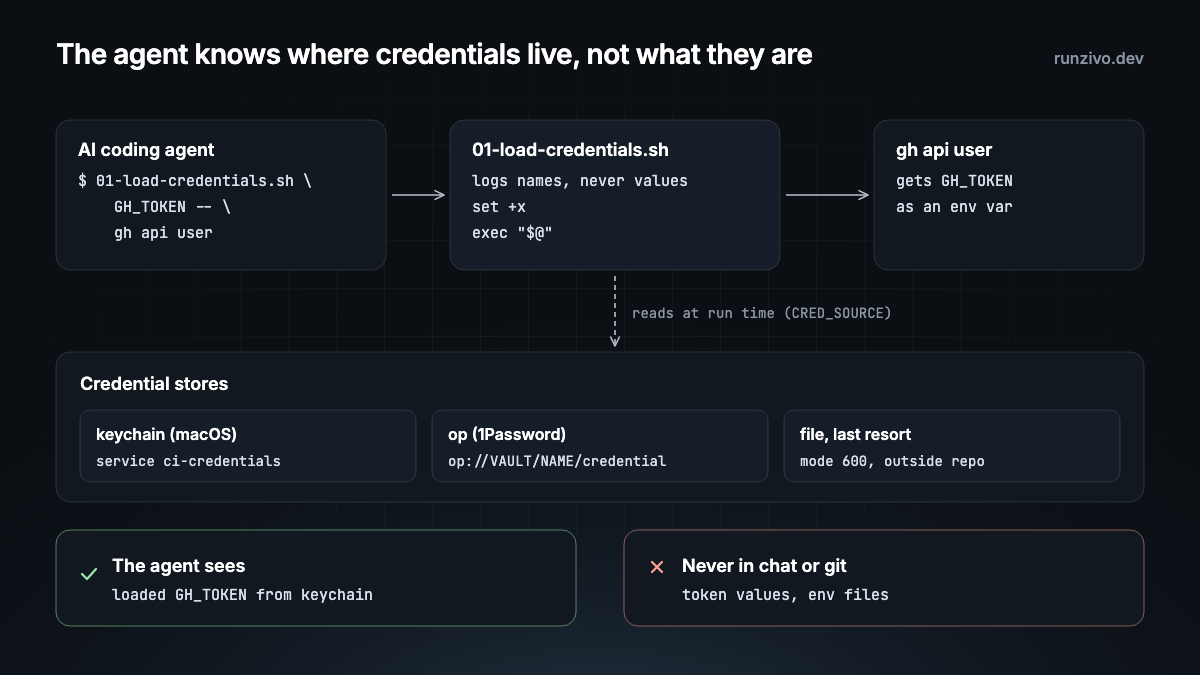
Tip 1: use a loader script
scripts/examples/01-load-credentials.sh takes variable names, loads each value, and runs one command. Its header explains the sources (lines 1 to 19):
#!/usr/bin/env bash
# Load credentials from where they already live, export them, and run a
# command with them. The caller (a person or an AI agent) only names the
# variables; values are never printed, logged or written to disk.
#
# Usage: 01-load-credentials.sh NAME [NAME...] -- COMMAND [ARGS...]
#   e.g. 01-load-credentials.sh GH_TOKEN -- gh api user --jq .login
#
# Sources, chosen by CRED_SOURCE (default: auto):
#   keychain  Mac Keychain item: service $CRED_KEYCHAIN_SERVICE
#             (default: ci-credentials), account NAME
#   op        1Password CLI: op://$CRED_OP_VAULT/NAME/credential
#   file      KEY=VALUE lines in $CRED_FILE (default:
#             ~/.config/ci-credentials/env). The file must be mode 600,
#             owned by you and outside the repository.
#   auto      keychain on a Mac, else op when CRED_OP_VAULT is set and op
#             is installed, else file.
set -Eeuo pipefail
set +x # never trace this script: traced lines would show values
The end of the script does the work (lines 116 to 124). It logs the name, never the value, then hands over to your command:
for name in "${names[@]}"; do
  value="$(read_value "$source_name" "$name")" || die "${name} not found in ${source_name}"
  [[ -n "$value" ]] || die "${name} is empty in ${source_name}"
  export "${name}=${value}"
  log_info "loaded ${name} from ${source_name}"
done
unset value

exec "$@"
The agent runs a command like these, from docs/ai-agent-guide.md:
# Mac Keychain item: service ci-credentials, account GH_TOKEN
scripts/examples/01-load-credentials.sh GH_TOKEN -- gh api user --jq .login
# 1Password: op://dev/GH_TOKEN/credential
CRED_SOURCE=op CRED_OP_VAULT=dev scripts/examples/01-load-credentials.sh GH_TOKEN -- make deploy-check
It knows the source of each credential. The values go to the child process, not into the conversation.
Tip 2: use the store you already have
- The OS keychain. On a Mac the script calls
security find-generic-password -s ci-credentials -a NAME -w. - A password manager CLI. For 1Password it calls
op readwithop://VAULT/NAME/credential. - An env file, as a last resort. It must be mode 600, owned by you and outside the repository. The script reads
KEY=VALUElines and runs nothing from the file. An agent with file access can still read it, so prefer the first two.
Some tools keep their own login. Tell the agent the profile name, not the key: gh auth token for the GitHub CLI, or a named profile with aws --profile.
Tip 3: test that values never print
The script has Bats tests in tests/bats/05-load-credentials.bats. They check that the value reaches the command and never appears in output, even when the caller turns on bash -x (lines 26 to 39):
@test "file source exports the value to the command without printing it" {
  run "$LOADER" API_TOKEN -- "${CHECK[@]}"
  [ "$status" -eq 0 ]
  [[ "$output" == *"loaded API_TOKEN from file"* ]]
  [[ "$output" == *"match"* ]]
  [[ "$output" != *"$SECRET"* ]]
}

@test "xtrace from the caller does not reveal the value" {
  run bash -x "$LOADER" API_TOKEN -- "${CHECK[@]}"
  [ "$status" -eq 0 ]
  [[ "$output" == *"match"* ]]
  [[ "$output" != *"$SECRET"* ]]
}
Other tests reject an env file readable by others or stored inside the repository.
Tip 4: never paste secrets into chat
Chat tools may store or log what you type. If a secret lands in a prompt, treat it as leaked and revoke it.
Tip 5: never commit credentials
Keep env files outside the repository. If one ends up inside it, make sure it is ignored. A simplified .gitignore:
.env
.env.*
!.env.example
*.pem
See GitHub's guide to ignoring files. Turn on push protection, which blocks pushes that contain detected secrets.
Tip 6: prefer short-lived, narrow tokens
- Use fine-grained personal access tokens limited to the repositories the task needs. Set an expiry.
- Use SSO sessions or temporary credentials for cloud CLIs where you can.
- Give the agent a dev account, such as your
01-dev-01environment, not production.
Tip 7: review every script before you run it
Read what the agent wrote, or reuse one you have already reviewed. Check that it:
- doesn't use
set -x,envorprintenv, which can print values - doesn't write credentials to a file or a log
- calls only the commands you expect
Also watch what the wrapped command prints. A test that dumps its environment will leak through any loader.
In the repo
scripts/examples/01-load-credentials.sh: the loadertests/bats/05-load-credentials.bats: its tests, with stubbedsecurityandop- Credentials during local work in
docs/ai-agent-guide.md AGENTS.md: rules for coding agents, including "never print secrets"
Every example in this series is tested in rzv-ci-plb, the Runzivo CI playbook, pinned to tag v0.1.0.