

A CI job should do one of two things. Pass, or fail with a clear reason. The worst outcome is a green job that hid a failure. The next worst is a red job that says only "exit code 1".
This post covers four tools: strict mode, traps, exit codes and logging. All code comes from rzv-ci-plb, the Runzivo CI playbook.
The common mistakes
Don't do this:
# Hides every failure, including the ones you care about.
npm test || true

# Exit status of a pipeline is the last command's. grep wins, tests lose.
npm test | tee test.log | grep -c passed

# Cleanup only runs if everything above it succeeded.
docker run -d --name test-db postgres:16
npm run integration
docker rm -f test-db
Strict mode, and what it misses
Start every Bash script with:
set -Eeuo pipefail| Flag | Effect |
|---|---|
-e | Exit when a command fails. |
-E | Let functions and subshells inherit the ERR trap. |
-u | Treat unset variables as errors. |
-o pipefail | A pipeline fails if any command in it fails, not only the last one. |
Strict mode has gaps. The Bash manual lists them. -e does not stop the script when the failing command is:
- the condition of an
if,whileoruntil - part of a
&&or||list, except the last command - negated with
!
So test your failure paths. Don't assume them.
Report the failing line
Every script in the playbook sources one helper and installs its traps. From scripts/lib/03-errors.sh:
# ERR trap handler. Reports the file, line and command text. The command
# text is shown before expansion, so variable values are not printed.
_errors_on_err() {
  local status=$1 line=$2 cmd=$3
  local file=${BASH_SOURCE[1]:-unknown}
  log_error "command failed (exit ${status}) at ${file##*/}:${line}: ${cmd}"
}

# Install ERR, INT and TERM traps. Use with `set -Eeuo pipefail`.
# INT and TERM exit with 130 and 143 so EXIT traps still run.
errors_install_traps() {
  trap '_errors_on_err "$?" "$LINENO" "$BASH_COMMAND"' ERR
  trap 'exit 130' INT
  trap 'exit 143' TERM
}
A failure then reads like this:
2026-10-18T22:55:46Z [ERROR] command failed (exit 1) at u.sh:5: falseINT and TERM exit with 130 and 143. Bash uses 128 plus the signal number for a command killed by a signal, so these match what callers expect. Inside GitHub Actions, log_error also prints an ::error:: annotation.
One caveat. The line number can differ between Bash versions. For a failure inside an if block, Bash 5.3 reported line 5 and Bash 3.2 (the default on a Mac) reported line 6. The command text is the same.
Clean up and keep the exit code
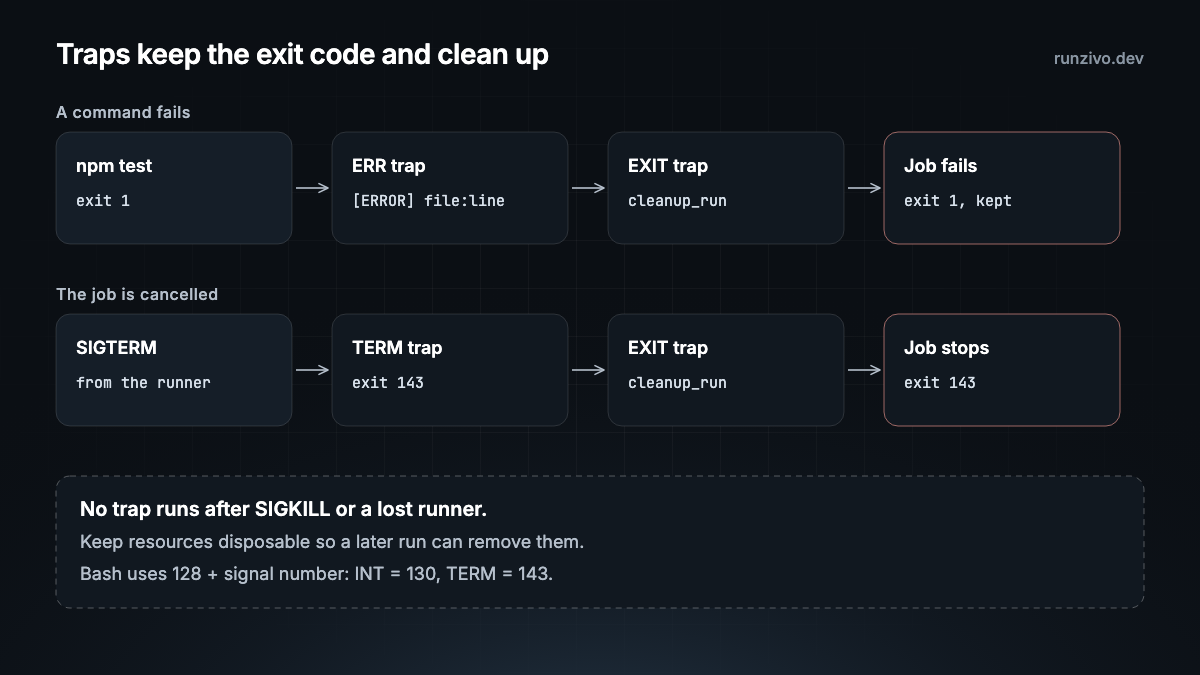
Register cleanup when you create a resource. The EXIT trap runs it, newest first, and keeps the original status. From scripts/lib/04-cleanup.sh:
_cleanup_on_exit() {
  local status=$?
  trap - EXIT
  cleanup_run
  exit "$status"
}

# Install the EXIT trap. Call once, near the top of the script.
cleanup_install_trap() {
  trap _cleanup_on_exit EXIT
}_cleanup_on_exitreads$?first, so it keeps the status that caused the exit.trap - EXITstops the cleanup from running twice.cleanup_runlogs a warning if one cleanup command fails and still runs the rest.
A script that uses both helpers starts like examples/docker/ci/02-test.sh:
set -Eeuo pipefail

SCRIPT_DIR="$(cd -- "$(dirname -- "${BASH_SOURCE[0]}")" && pwd -P)"
APP_DIR="$(cd -- "${SCRIPT_DIR}/.." && pwd -P)"
# When you copy this example, point LIB_DIR at your copy of scripts/lib.
LIB_DIR="$(cd -- "${SCRIPT_DIR}/../../../scripts/lib" && pwd -P)"
# shellcheck source=../../../scripts/lib/03-errors.sh
source "${LIB_DIR}/03-errors.sh"
# shellcheck source=../../../scripts/lib/04-cleanup.sh
source "${LIB_DIR}/04-cleanup.sh"

errors_install_traps
cleanup_install_trap
Two limits. No trap runs after SIGKILL, and none runs if the runner itself is lost. Keep resources disposable, for example temp directories and labelled containers, so a later run can remove them.
Handle expected failures on purpose
When a failure is normal, say so in code. From the same Docker smoke test:
    # Logs are best effort: a container that failed to start may have none.
    docker logs "$container_id" >"${REPORT_DIR}/docker-container.log" 2>&1 ||
      log_warn "could not save container logs"
When a failure matters, stop with a clear message and an exit code. die logs the error and exits, with code 1 unless you pass another:
[[ "$body" == "ok" ]] || die "unexpected /healthz body: ${body}"Consistent logging
Logs go to stderr as [INFO], [WARN] or [ERROR] lines with a UTC timestamp. Inside GitHub Actions, warnings and errors also become annotations. From scripts/lib/01-logging.sh:
_log_line() {
  local level=$1
  shift
  printf '%s [%s] %s\n' "$(date -u '+%Y-%m-%dT%H:%M:%SZ')" "$level" "$*" >&2
}

log_info() {
  _log_line INFO "$@"
}

log_warn() {
  _log_line WARN "$@"
  if in_github_actions; then
    printf '::warning::%s\n' "$(_log_escape "$*")" >&2
  fi
}

log_error() {
  _log_line ERROR "$@"
  if in_github_actions; then
    printf '::error::%s\n' "$(_log_escape "$*")" >&2
  fi
}
The same file has log_group_start, log_group_end and summary_add. They print ::group:: folds and append Markdown to $GITHUB_STEP_SUMMARY inside Actions, and fall back to plain output locally. In use, from scripts/ci/01-validate.sh:
  log_group_start "shellcheck (${#files[@]} files)"
  shellcheck "${files[@]}"
  log_group_end

  log_group_start "shfmt"
  shfmt --diff "${files[@]}"
  log_group_end

  summary_add "- Lint: actionlint, shellcheck and shfmt passed"
Never log a secret. GitHub masks registered secrets, but its secure use guide says automatic redaction is not guaranteed. The ERR handler above prints the command text before expansion, so a failing curl -H "Authorization: $TOKEN" shows $TOKEN, not its value.
Test the failure paths
Bats runs shell scripts and checks the result. These tests build a small script with the helpers loaded, then send it a signal. From tests/bats/04-cleanup.bats:
@test "cleanup runs on SIGTERM and SIGINT" {
  script="$(write_script term.sh "cleanup_register rm -rf -- '${WORK}'
kill -TERM \$\$
sleep 5")"
  run "$script"
  [ "$status" -eq 143 ]
  [ ! -e "$WORK" ]

  mkdir -p "$WORK"
  script="$(write_script int.sh "cleanup_register rm -rf -- '${WORK}'
kill -INT \$\$
sleep 5")"
  run "$script"
  [ "$status" -eq 130 ]
  [ ! -e "$WORK" ]
}
write_script comes from tests/bats/00-test-helper.bash. Run every test with bash scripts/ci/02-test.sh bats.
Running on Runzivo
Runzivo, now in Early Access, runs each eligible job in a fresh microVM that is destroyed after the job. That removes leftovers between jobs. It does not remove the need for traps: your script still owns cleanup inside the job, and anything it creates outside the runner. Change runs-on: rzv-ubuntu-24.04-x64-2vcpu-8gb to try it. See the Runzivo docs.
In the repo
scripts/lib/03-errors.sh:die,errors_install_traps,require_cmd,require_env,retryscripts/lib/04-cleanup.sh:cleanup_install_trap,cleanup_register,cleanup_temp_dirscripts/lib/01-logging.sh: log levels, groups, annotations and the step summarytests/bats/03-errors.batsandtests/bats/04-cleanup.batsexamples/docker/ci/02-test.sh: all of the above in one real script
Next: permissions, secrets and untrusted pull requests.
Every example in this series is tested in rzv-ci-plb, the Runzivo CI playbook, pinned to tag v0.1.0.