

A run: block starts as one line. Then someone adds a retry. Then a check. Six months later it is 50 lines of Bash inside YAML, and nobody can run it outside CI.
This post shows how to move that logic into scripts, using the Docker example from rzv-ci-plb, the Runzivo CI playbook.
The common mistake
Don't do this. A smoke test written inline:
- name: Smoke test image
  run: |
    docker run -d --name app -p 8080:8080 "app:${{ github.sha }}"
    for attempt in 1 2 3 4 5; do
      if curl -fsS http://127.0.0.1:8080/healthz; then
        break
      fi
      sleep 1
    done
    docker rm -f app
It looks fine. It has four problems:
- It passes when the app is broken. If every
curlfails, the loop ends quietly anddocker rmsucceeds, so the step exits 0. I ran it with a failingcurlto confirm. - Cleanup is skipped on failure. If
docker runfails, the step stops beforedocker rm. - You can't run it locally without copying it out of the YAML.
${{ github.sha }}is pasted into the script text before the shell starts. That is safe for a SHA. The same habit with a pull request title is a script injection.
One more detail: without shell: bash, GitHub runs this with bash -e {0}, which has no pipefail. With shell: bash, it runs bash --noprofile --norc -eo pipefail {0}. The workflow syntax reference lists both. The playbook sets defaults.run.shell: bash in every workflow.
The three-line rule
My rule: a run: block of three lines or fewer can stay inline. Move it to a script when it has:
- conditions or loops
- retries
- cleanup
- error handling
- more than three lines
This is a Runzivo convention, not a GitHub requirement. It is stricter than the Google Shell Style Guide, which suggests a structured language once a script passes 100 lines or has non-straightforward control flow. The point is the same: keep shell small and easy to read.
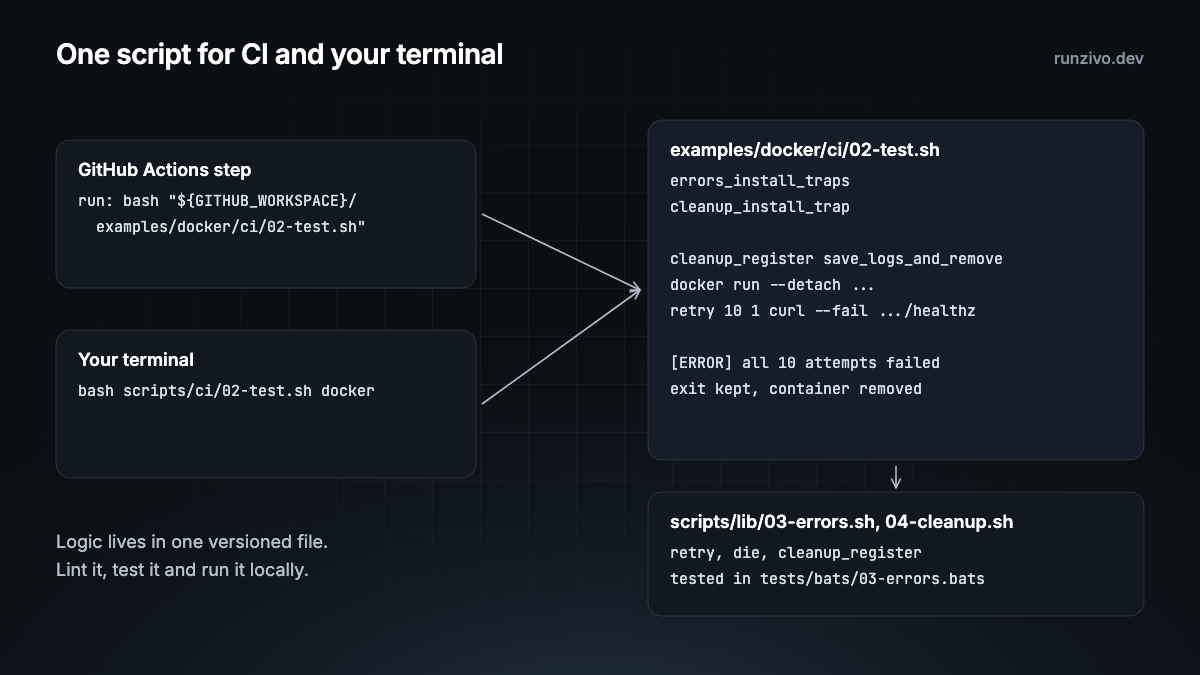
The recommended approach
The workflow steps become single calls. Values come in through env:. From example-docker.yml:
- name: Build image
  run: bash "${GITHUB_WORKSPACE}/examples/docker/ci/01-build.sh"

- name: Smoke test image
  env:
    REPORT_DIR: ${{ runner.temp }}/reports
  run: bash "${GITHUB_WORKSPACE}/examples/docker/ci/02-test.sh"
The image name comes from a job-level env: block (IMAGE), so no expression lands inside a script.
The smoke test script holds the logic. This excerpt is from examples/docker/ci/02-test.sh:
container_id=""
save_logs_and_remove() {
  if [[ -n "$container_id" ]]; then
    # Logs are best effort: a container that failed to start may have none.
    docker logs "$container_id" >"${REPORT_DIR}/docker-container.log" 2>&1 ||
      log_warn "could not save container logs"
    docker rm -f "$container_id" >/dev/null
  fi
}
cleanup_register save_logs_and_remove

log_group_start "Start container"
container_id="$(docker run --detach --publish 127.0.0.1::8080 \
  --label "ci.example=docker" --read-only --cap-drop ALL "$IMAGE")"
host_port="$(docker port "$container_id" 8080/tcp)"
host_port="${host_port##*:}"
log_info "container ${container_id:0:12} listening on 127.0.0.1:${host_port}"
log_group_end

log_group_start "Check /healthz"
body="$(retry 10 1 curl --fail --silent --show-error "http://127.0.0.1:${host_port}/healthz")"
[[ "$body" == "ok" ]] || die "unexpected /healthz body: ${body}"
log_group_end
Each problem from the inline version is fixed:
retryreturns the last exit code when every attempt fails, so a broken app fails the step. Seeretryinscripts/lib/03-errors.sh.cleanup_registerremoves the container on success, failure or cancellation. Seescripts/lib/04-cleanup.sh.- The script runs the same way on a laptop:
bash scripts/ci/02-test.sh dockerThat builds the image with 01-build.sh, then runs 02-test.sh.
Number scripts in run order
Every script in the playbook starts with a two-digit number: 01-build.sh runs before 02-test.sh, and 00 is for setup. Directory listings then show the order, and an unused script stands out. See numbered scripts.
What you get
Local runs. A developer reproduces a CI failure with one command.
Real linting. ShellCheck reads a .sh file directly. actionlint also runs ShellCheck on run: blocks, but a script file is easier to check, format and review.
Tests. Bats tests the shared helpers, including the failure paths. See tests/bats/03-errors.bats for retry.
Portable workflows. The YAML only coordinates, so moving it to another compatible runner means changing runs-on, not rewriting steps.
Commands to check your scripts
From the repository README:
brew install actionlint shellcheck shfmt bats-core zizmor   # on a Mac
bash scripts/ci/01-validate.sh        # actionlint, shellcheck, shfmt, zizmor
bash scripts/ci/02-test.sh            # Bats tests and every example
bash scripts/ci/02-test.sh golang     # one suite
When inline is fine
Short, single-purpose commands can stay in YAML. A simplified example:
- name: Install dependencies
  run: npm ci
If you are unsure, ask: "Would I want to run this on my laptop when it fails?" If yes, make it a script.
Running on Runzivo
Runzivo is in Early Access. It runs each eligible GitHub Actions job in a fresh, single-use microVM. Because the logic lives in scripts, moving a job means changing one line:
runs-on: rzv-ubuntu-24.04-x64-2vcpu-8gbSee examples/runzivo-runners and the Runzivo docs.
In the repo
examples/docker/ci/01-build.shand02-test.sh.github/workflows/example-docker.ymlscripts/lib/03-errors.sh(retry,die) andscripts/lib/04-cleanup.shscripts/ci/02-test.sh: runs one suite or all of themAGENTS.mdscript rules: the three-line rule and numbering, written for coding agents
Next: error handling with traps, cleanup, logging and exit codes.
Every example in this series is tested in rzv-ci-plb, the Runzivo CI playbook, pinned to tag v0.1.0.